How to reach Support and Service Management
Need help from Support or Service Management? Here are your best options:
IN-TICKET SATISFACTION SURVEY
Rate your satisfaction while the ticket is still open: Every agent reply includes an option for you to tell how you feel about the ticket while it is still open:
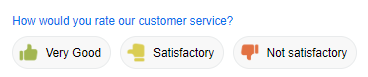
Tickets marked as Not Satisfactory alert management so we can check on things right away. Though you can still email customercare@batchmaster.com, please do use the in-ticket Survey as soon as you feel you need manager help. Also, no matter what the rating, comments are appreciated.
EXISTING TICKET
CC: customercare@batchmaster.com in your email reply or in the ticket online to alert Support and Service Management, and we will look into your request. Please include the following:
- Support Ticket or Service Request ID(s)
- A description of your concern
- What type of help you need from management
- Optional: the name of the manager you have been working with, if any
- You may cc: others, such as your account manager, but we encourage you to always email customercare@batchmaster.com directly to reach the right people the fastest.
A manager will review your request and ticket, then reply to you with a plan of action. Then your ticket will be marked as escalated and appear on management's priority dashboard.
Note that escalating to your Account Manager or other party directly may delay assistance.
URGENT CRITICAL TICKET
Please do all three for critical tickets:
- Create your ticket with customercare@batchmaster.com in the cc: field
- Call (949) 835-3705 and choose Application support.